Looking for a
HappySignals alternative?
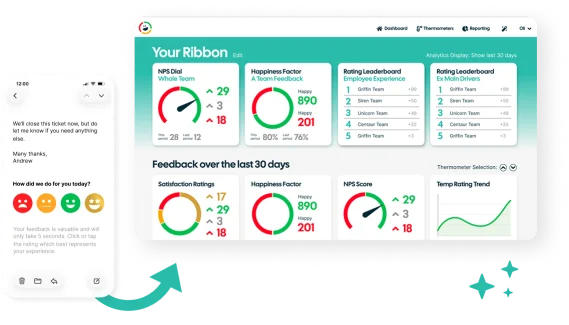
Customer Thermometer is a HappySignals alternative for IT service desks and other teams that want a simpler, flexible way to collect actionable feedback.
Get set up for free in seconds – No credit card or development required
Collect feedback
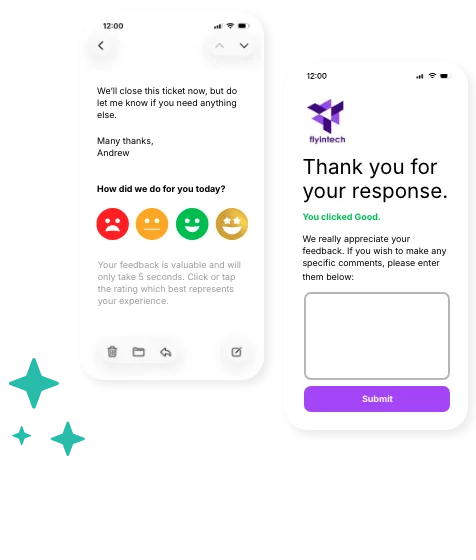
While HappySignals focuses on IT Experience Management (ITXM), Customer Thermometer focuses on making feedback easy to collect across service desk interactions, email signatures and other customer and employee touchpoints.

Understand better
Capture one-click feedback after support interactions, through email signatures and across other important touchpoints. Use real-time alerts, feedback drivers and ready-made reporting to understand what people are telling you.
Customer Thermometer vs HappySignals: what’s the difference?
Customer Thermometer and HappySignals both help organizations understand how people feel about the service and support they receive, but they approach feedback differently.
HappySignals is built around IT Experience Management, combining continuous employee experience measurement with operational IT data.
Customer Thermometer takes a broader, simpler approach to feedback. It gives teams a flexible way to collect one-click responses at the moments that matter, understand what’s driving sentiment and act quickly when someone needs attention.
| Feature |  | HappySignals |
|---|---|---|
| Core focus |  Easy, flexible customer and employee feedback across multiple touchpoints | IT Experience Management and Intelligence |
| One-click feedback | Response captured from the first click | Supports one-click surveys |
| Ticket-based feedback | Collect feedback following service and support interactions | Ticket-based surveys supported |
| Email signature surveys | Core part of the platform for always-on feedback |  Focused primarily on IT experience measurement |
| Survey customization | Customize questions, icons, colors, branding and landing pages | Not available on all plans |
| Feedback Drivers | Dedicated Feedback Drivers help explain why someone gave their score | Experience factors and analytics provided |
| Real-time alerts | Alert teams when feedback needs attention | Instant Feedback Loop workflows supported |
| Reporting | Ready-made CSAT, NPS, trend, team and individual reporting | IT experience analytics, segmentation and benchmarking |
| Additional follow-up questions | Ask an additional question after the initial response to understand the feedback in more detail | Not available on all plans |
| Target settings | Available on all plans | Not available on all plans |
| Human support | Ministry of Magic support as standard | Support available |
| Custom reports | Personalized CSAT Ribbon to create your own pinnable reports | Not available on all plans |
| Number of users | Unlimited on all plans | Restricted by plan |
Why choose Customer Thermometer?

Collect feedback wherever it makes senseCollect responses after support tickets, add surveys to employee email signatures or ask for feedback at other important moments in the customer or employee journey.

Make responding effortlessGive people a quick way to tell you how they feel. The first click records their response, with the option to collect additional comments and context afterwards.
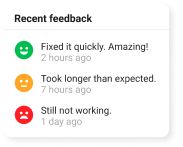
Understand what’s behind the scoreFeedback Drivers help you understand the reasons behind positive and negative responses, making it easier to identify recurring issues and see what’s working.
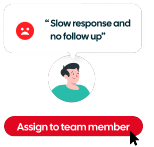
Act while the feedback is relevantUse real-time alerts to be notified when feedback needs urgent attention. Closed-loop feedback tools help you keep track of responses and make sure important feedback doesn’t simply disappear into a dashboard.
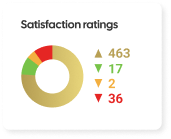
Reporting without the complexityStart seeing useful feedback from your first responses with ready-made dashboards and reporting. Track CSAT and NPS, monitor trends, compare teams and individuals, and give stakeholders a clear view of customer and employee sentiment.
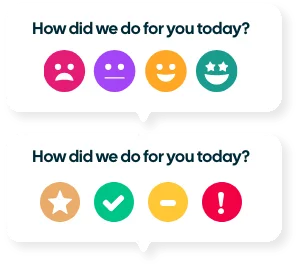
Make it your ownCustomize your questions, icons, colors, landing pages and branding so the feedback experience fits your organization rather than feeling like a separate survey system.

Is Customer Thermometer a good HappySignals alternative for your team?
Customer Thermometer is designed for teams that want to collect quick, frequent feedback without asking customers to complete lengthy surveys.
It works particularly well for customer service, IT support, helpdesk, account management and MSP teams that want to measure customer satisfaction at key points in the customer journey.
See how easy it is for customers to share feedback without leaving their inbox.
Connect Customer Thermometer with the tools you already use
Bring feedback into the platforms your customer service, support and account teams use every day.
See All Integrations
ServiceNow
Insert survey buttons into incident and request notifications

Freshdesk
Embed feedback buttons into support threads

Jira
Get feedback on your requests and technicians

Ivanti
Place surveys inside service management emails

Halo PSA
Add feedback buttons to your Halo PSA tickets

Microsoft Teams
Get a live stream of feedback into your Teams channels

Salesforce
Trigger thermometers during your workflows
Trusted by teams that care about customer feedback




“Our community is at the very core of what we do at Glossier, so providing the highest level of customer service is a must for our team. CT gives us important insights that we use to constantly improve our processes and ensure that our standards of excellence are being upheld.”


“We have been completely blown away by the results of using CT. In the first 3 months, we had x6 the number of responses we hoped for. It’s easy to share internally, enabling teams to see live data on their own personal ‘thermometers’ so that they can see the effect they are having and strive to improve even further.”


“It’s a superb pulse on customer feedback, allowing us to personally thank colleagues who have delivered brilliant service and focus on areas that are not working as they should. It’s the easiest thing in the world for our customers to respond to. And I think simplicity in this day and age is what we all want.”

Ready for a simpler way to collect and act on feedback?
Start collecting one-click feedback and give your teams the context they need to understand sentiment, spot issues and take action.
Talk to our teamFrequently asked questions
What is a good alternative to HappySignals? +
Customer Thermometer is an option for teams looking for a simpler, flexible alternative to HappySignals for collecting and acting on customer or employee feedback. It provides one-click surveys, Feedback Drivers, real-time alerts, reporting and integrations with the tools teams already use.
Is Customer Thermometer a good HappySignals alternative for your team? +
Customer Thermometer is a good fit for organizations that want to collect regular, actionable feedback without making feedback management a complex project.
It can be used by IT service desks, support teams, customer service teams, account management teams and other customer or employee-facing functions.
Rather than focusing exclusively on IT Experience Management, Customer Thermometer gives you the flexibility to collect feedback across different teams and touchpoints from one platform.
See how easy it is to collect feedback in one click.
Does Customer Thermometer collect IT service desk feedback? +
Yes. Customer Thermometer can collect feedback following IT support and service desk interactions, helping teams understand how users feel about the service they receive and identify individual responses that need attention.
Can Customer Thermometer collect feedback outside the service desk? +
Yes. Customer Thermometer isn’t limited to ticket-based feedback. Surveys can be added to email signatures and used across other customer and employee touchpoints, allowing organizations to understand experiences beyond individual support tickets.
Does Customer Thermometer integrate with ServiceNow? +
Yes. Customer Thermometer integrates with ServiceNow, allowing organizations to incorporate one-click feedback into their existing IT service management workflows.
What other integrations does Customer Thermometer support? +
Customer Thermometer works with a wide range of platforms, including Zendesk, ConnectWise, Salesforce, Microsoft Teams, Slack and Outlook, alongside ServiceNow. APIs and webhooks can also be used to connect feedback with existing workflows.
Does Customer Thermometer support CSAT and NPS? +
Yes. Customer Thermometer supports CSAT and NPS, alongside other ways of collecting and understanding customer and employee sentiment.
Can Customer Thermometer surveys be added to email signatures? +
Absolutely. One-click surveys can be embedded directly into email signatures, making it possible to collect feedback during everyday interactions rather than waiting for a ticket to close or sending a separate survey.
Can I customize Customer Thermometer surveys? +
Yes. You can customize survey questions, icons, colors, branding and landing pages to create a feedback experience that fits your organization.
How quickly can I get started with Customer Thermometer? +
Customer Thermometer is designed to make getting started straightforward. You can create and brand your survey, connect the tools you need and begin collecting feedback without a lengthy implementation project.